IPPR 003
· 10 min read
Feature Detection
- Detect invariant features of the image.
- Describe the local area around each feature.
- Match patterns of the feature descriptions.
Moravec conner detector
- One of the earliest corner detectors (1980)
- Moravec detects a corner by shifting a small window in different directions and checking whether the image changes significantly in every direction.
- Shifting a window in any direction should give a large change in intensity, measured in terms of Sum of Squared Differences (SSD).
- is how much the window is shifted.
- Larger indicates the image changes more after the shift.
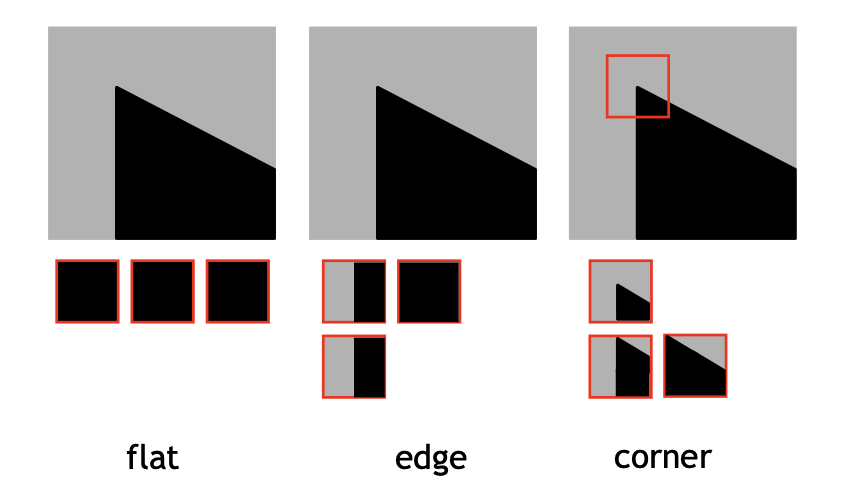
- Flat: , No change in any direction
- Edge: , Change in some direction
- Corner: , Large change in every direction
Harris corner detector
- Improvement over Moravec change of intensify for a shifted windoe centered at
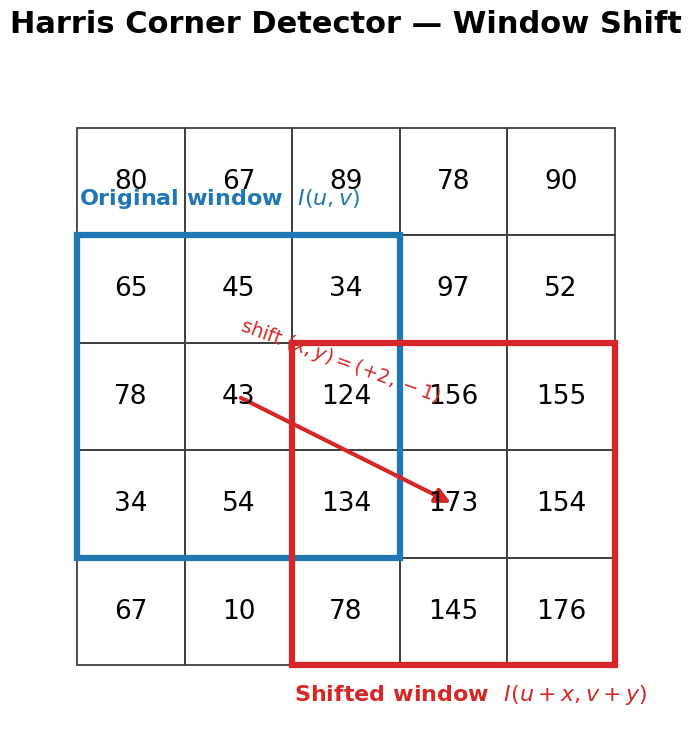
- move 1px to the right.
- move down 1px.
- move 2px to the right and 1px down.
- : Pixel intensity of the original point.
- : Pixel intensity of the shifted point.
- SSD: if , and , then the SSD is .
- : window function, usually apply gaussian weighting to the pixels around the center.
- if we calculate all the step by step, it will be computationally expensive.
- so we use Taylor Expansion to approximate the intensity change.
Taylor Expansion
- Let and be the partial derivatives of
- Approximates the intensity of the slightly shifted point, using the current intensity and gradient information.
- : How much the intensity changes when moving to the right or left a little bit.
- : How much the intensity changes when moving up or down a little bit.
- because .
- we can calculate intensity change by x/y gradient and the window shift.
- Eigenvector = direction of the change
- Eigenvalue = magnitude of the change
- if both , the point is flat.
- if either the point is an edge.
- if both the point is a corner.
-
- it can check if the point is a corner by checking if are both large.
-
- it can penalizes edge-like responses where one eigenvalue is large but the other is small.
-
- is an empirical constant, typically set .
- A threshold is applied an corners detected, non-maxima are suppressed.
- can be derived from eigenvalues of the matrix .
- the point is flat.
- the point is an edge.
- the point is a corner.
Harris corner detection pipeline
- Compute the Harris response for every pixel.
- Large positive indicates a strong corner response.
- Apply a threshold to remove weak responses.
- Apply non-maximum suppression to keep only local maxima.
- Overlay the remaining points on the original image as detected corners.
Detector vs descriptor
- Detector: detect the location of the features in an image or video (WHERE).
- Descriptor: descriptors summarize the appearance of the neighborhood (WHAT IT LOOKS LIKE).
- A good feature detector should be:
- make similar descriptors for similar features of the same object.
- Invariance: the descriptor should be invariant to translation, rotation, scale, and illumination.
SIFT
Scale-Invariant Feature Transform
- It was proposed by Lowe in 1999, includes both a detector and a descriptor.
- A method to detect and match local features despite changes in scale and rotation.
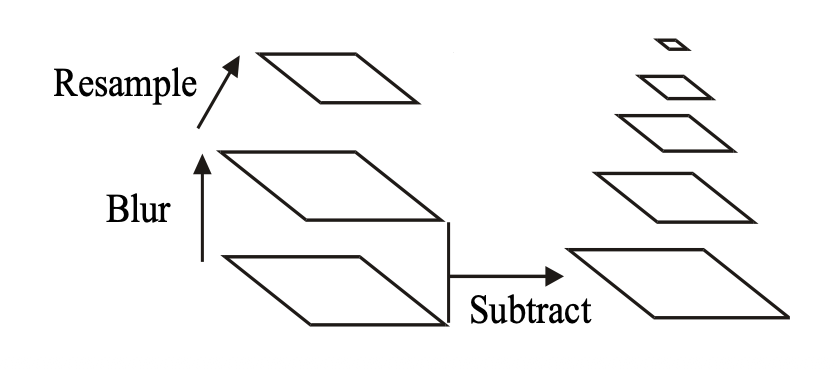
- Core idea: build multiple blurred versions of the image, compute their differences, and find points that stand out across scales.
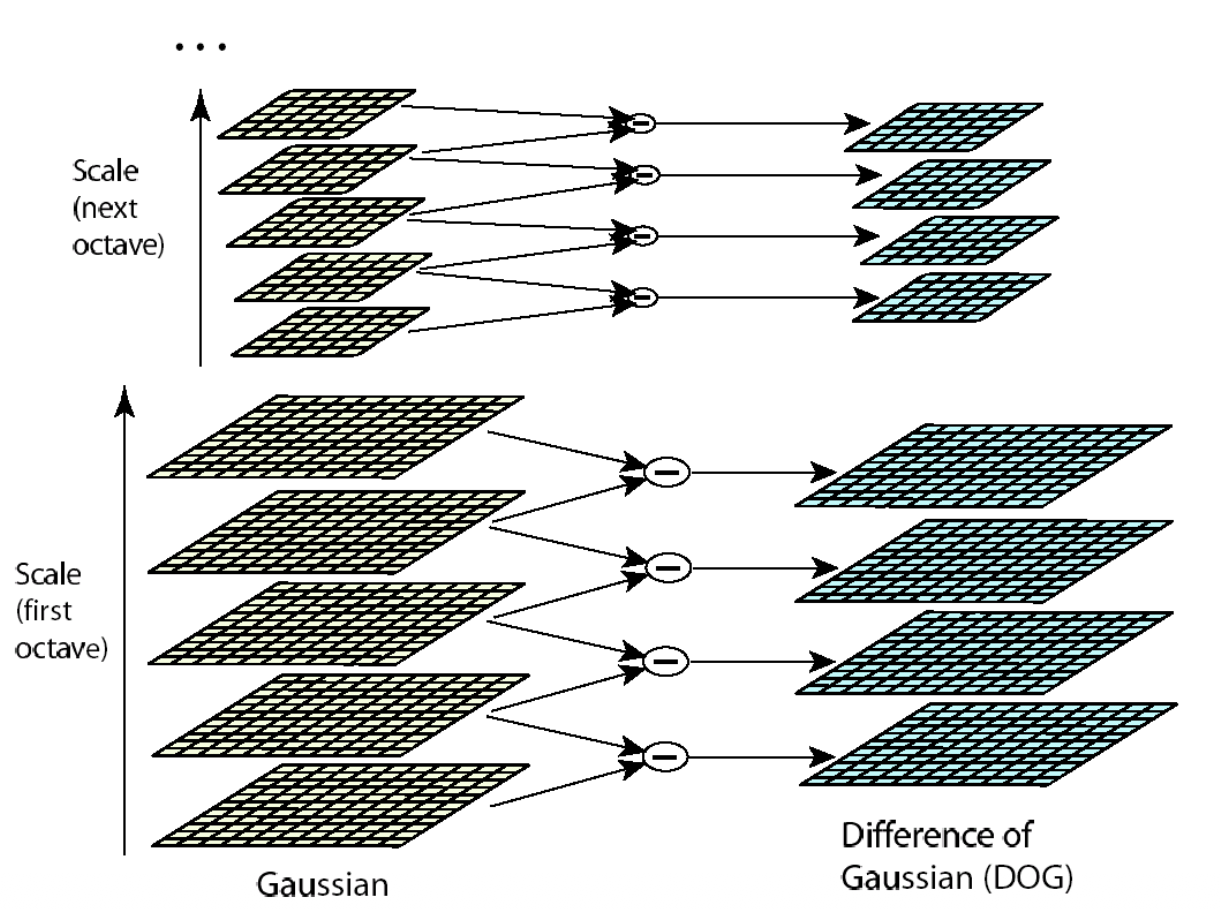
- Build a scale-space pyramid of Differences of Gaussians (DoG) and detect minima/maxima.
- Localize keypoints.
- Assign them an orientation.
- Compute the SIFT descriptor.
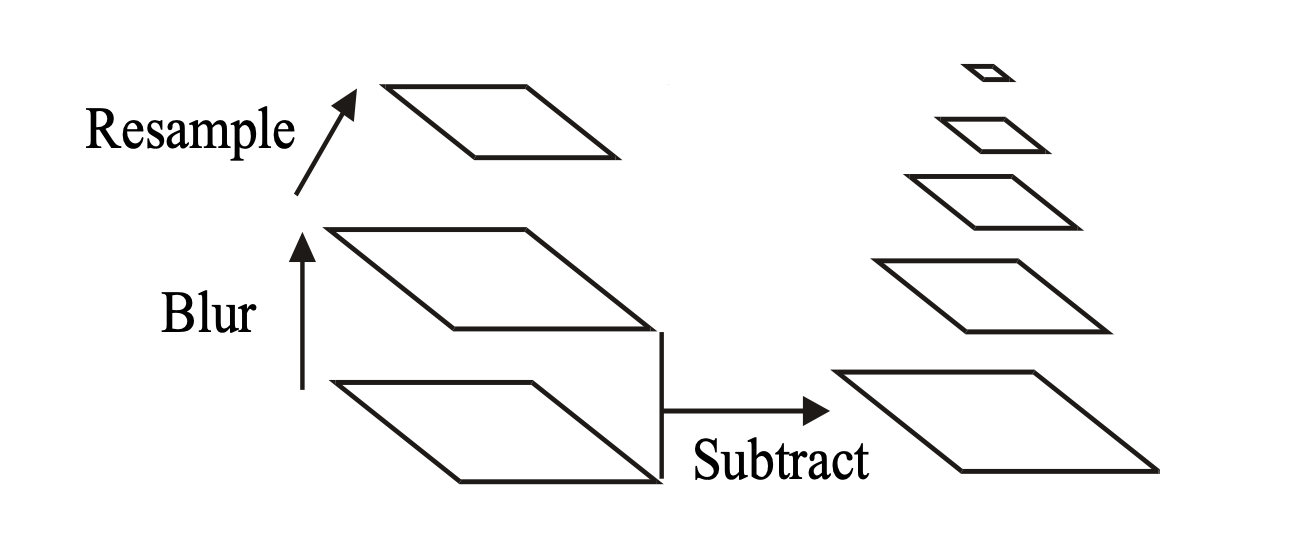
- : Blurred image at scale .
- : Difference of Gaussians at scale .
- Octave: a group of scale-space images at the same resolution.
- After each octave, the image is typically downsampled by a factor of 2.
Key point localization
- Detect local maxima and minima in DoG scale space.
- Remove low-contrast points because they are unstable and sensitive to noise.
- Remove edge responses because their locations are poorly localized.
- Use the ratio of principal curvatures to distinguish edges from stable corner/blob-like features.
- Example:
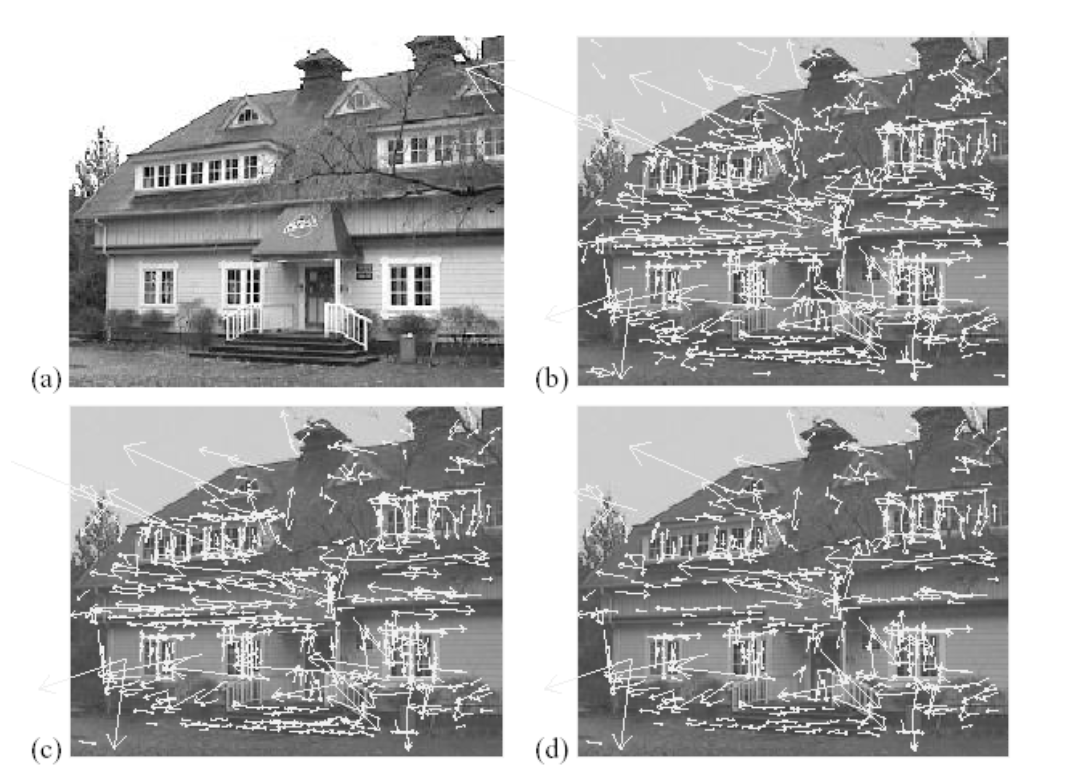
- (a): Original image (233x189)
- (b): 832 DoG extrema
- (c): 729 left after peak-value threshold
- (d): left after testing the ratio of principal curvatures.
Orientation assignment
- For every keypoint, compute the gradient at each location in its local neighborhood.
- The gradients are computed on the Gaussian-blurred image at the keypoint's scale, .
- Gradient directions are quantized into 36 bins over .
- Each gradient contributes to the histogram according to its magnitude.
- The dominant histogram bin is assigned as the keypoint's orientation.
- This orientation becomes the anchor direction for the SIFT descriptor.
SIFT descriptor
SIFT descriptor = 128-dimensional vector
- A 16x16 grid of locations of the gradient at scale around the keypoint.
- The grid is divided into 4x4 sub-grids of 4x4 locations each.
- For each sub-grid, an 8-bin histogram of the magnitude weighted gradient orientation is computed.
- All 8 bins are retained.
- The histogram from all the sub-grids are concatenated into the SIFT descriptor.
- The dimensionality is given by 8 bins x 16 histograms = 128.
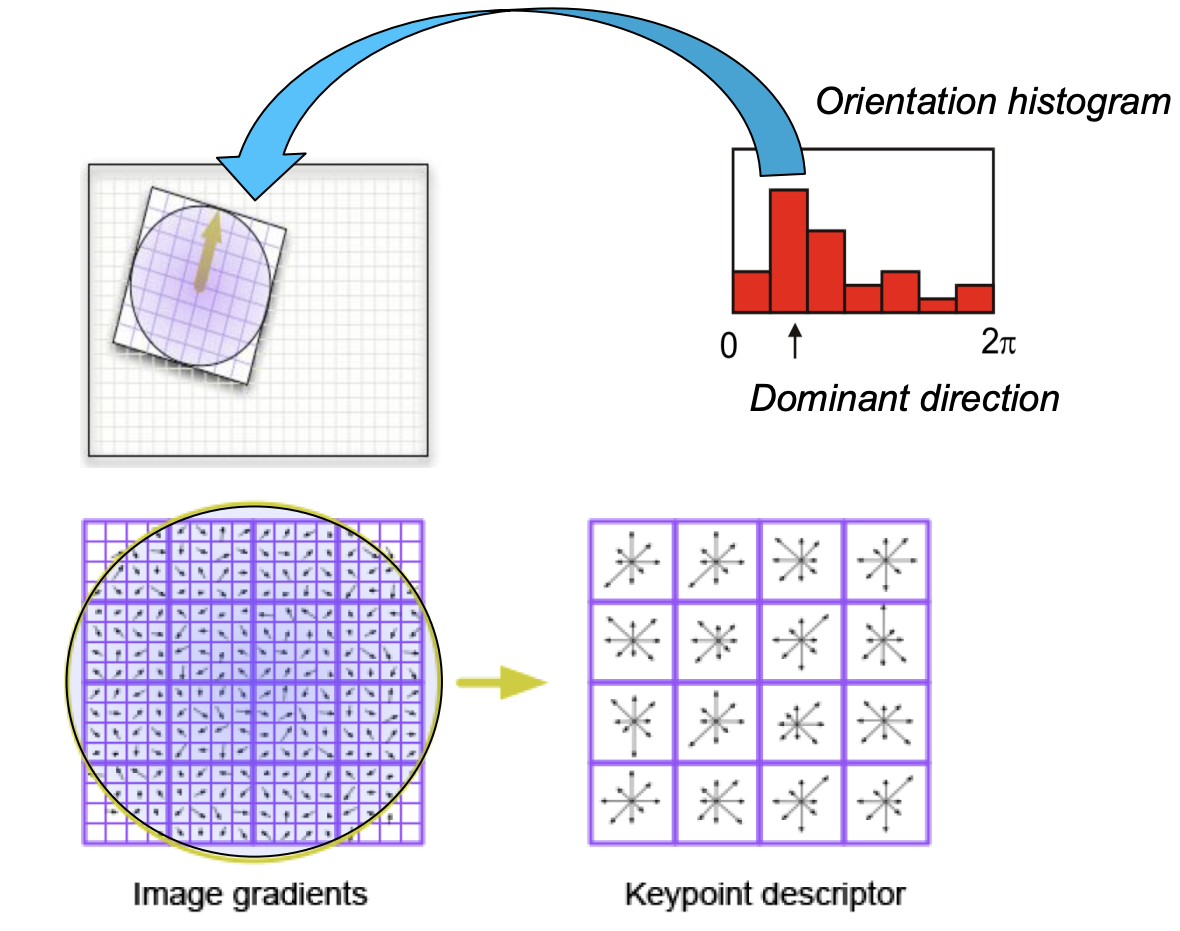
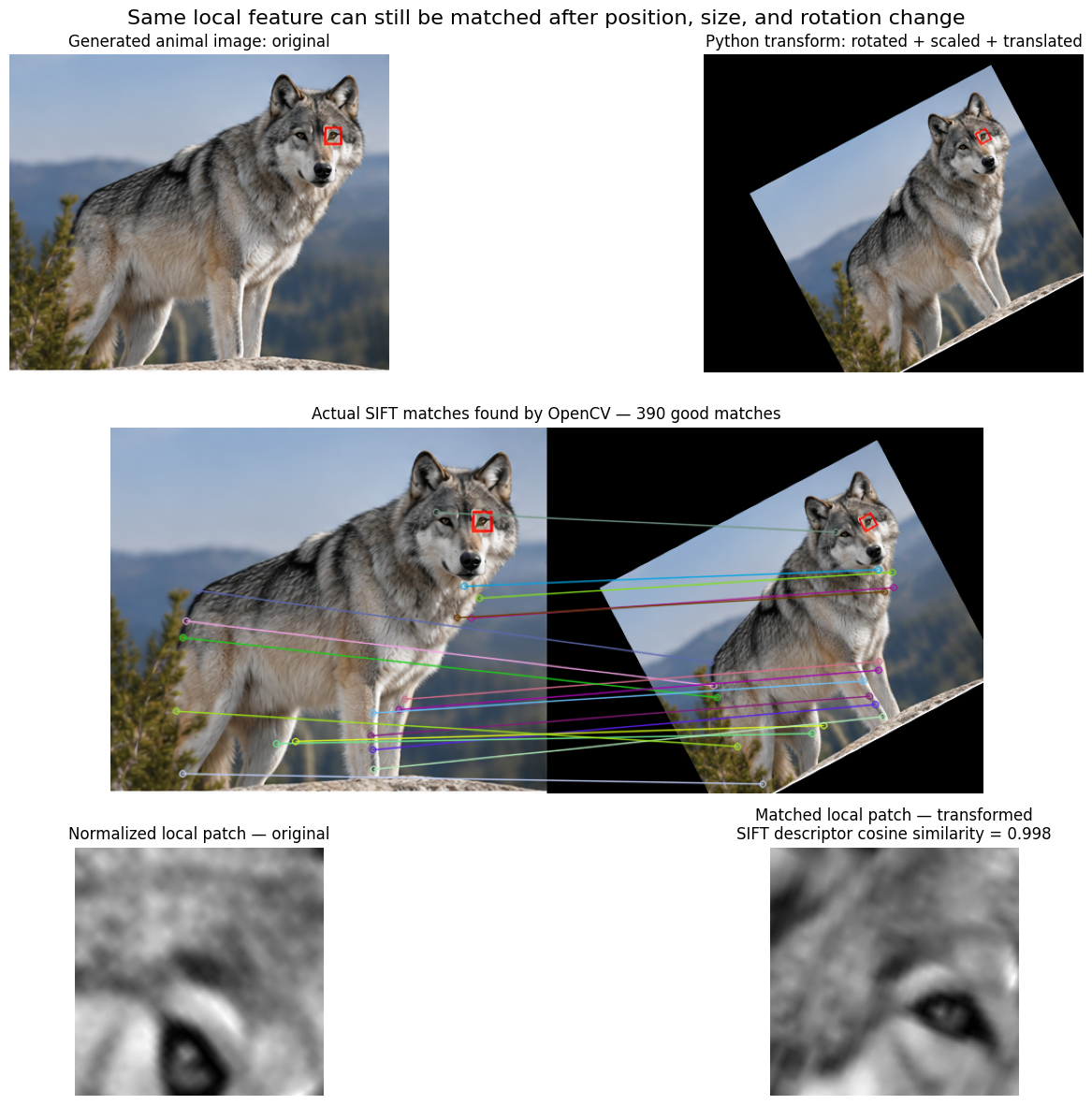
- SIFT Features encode information about at 16x16 area around the feature point at the appropriate scale.
- It is scale, rotation, and translation invariant.
- Similar features give similar SIFT values regardless of orientation, scale, and translation.
Applications of SIFT
- Object recognition: SIFT descriptors are extracted from an input image and matched to the SIFT descriptors of known objects in a database.
- Stereo vision: SIFT descriptors from the left and right images are matched to create the disparity map.
- Tracking: SIFT descriptors from successive frames are matched to track a target.
- Object and action classification: histograms of SIFT descriptors are computed over single frames or whole videos and used as input for a classifier.
Object classification
- Object classification uses histograms of SIFT descriptors to characterize the class of an object.
- A popular histogram representation is called Bag of Features (BoF).
- BoF first requires creating a dictionary, also called a codebook, from the training set.
- Once the dictionary is computed, a Bag of Features can be computed for any image.
- The resulting Bag of Features is then used for classification.
# Example SIFT descriptors from training images
descriptors = [
    [1.0, 1.2],
    [0.9, 1.1],
    [1.1, 0.8],

    [5.0, 5.1],
    [4.8, 5.2],
    [5.2, 4.9],

    [9.0, 1.0],
    [8.8, 1.2],
]

# Representative descriptors after clustering
codebook = [
    [1.0, 1.0],   # codeword 1
    [5.0, 5.0],   # codeword 2
    [9.0, 1.0],   # codeword 3
]

# SIFT descriptors from a new image
new_image_descriptors = [
    [1.2, 0.9],
    [0.8, 1.1],
    [5.1, 4.9],
    [9.2, 1.1],
    [8.9, 0.8],
]

# Nearest codeword assignments
assignments = [
    0,  # -> codeword 1
    0,  # -> codeword 1
    1,  # -> codeword 2
    2,  # -> codeword 3
    2,  # -> codeword 3
]

# Bag of Features histogram
bof = [2, 1, 2]
Dictionary creation
- Extract all SIFT descriptors from the training images.
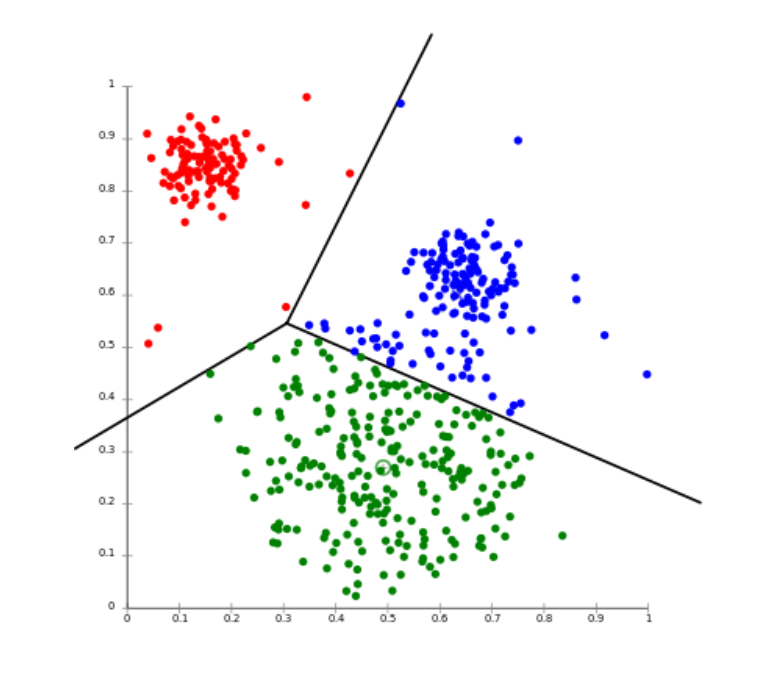
- Use a clustering algorithm, typically k-means, to group the descriptors into clusters.
- The descriptor space is partitioned into regions.
- Example: .
- The resulting clusters form the dictionary/codebook.
Bag of Features
- Map all SIFT descriptors of an image to clusters in the dictionary.
- Count the number of descriptors assigned to each cluster.
- Form a histogram with bins.
- Use this histogram as a measurement vector for a classifier.
- Possible classifiers include Bayes, SVM, KNN, and neural networks.
Other Local Features
- SURF (Speeded Up Robust Features): another local feature method designed to provide robust features with faster computation.
- GLOH (Gradient Location and Orientation Histogram): describes local image structure using gradient location and orientation histograms.
- HOG (Histogram of Oriented Gradients): represents local regions using histograms of gradient orientations.
- For classification, descriptors can be extracted either from detected interest points or from a regular grid.
- Descriptors extracted from a regular grid are called dense features.
Spatio-temporal local features
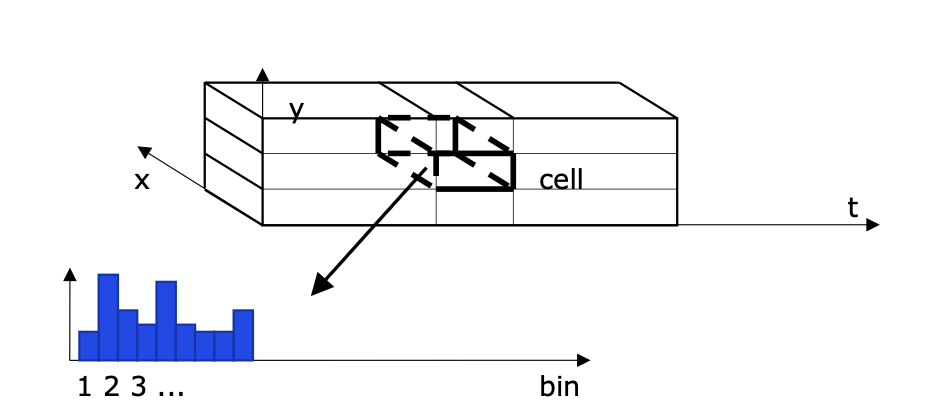
- In video, local features can be extracted from each frame separately or as 3D local features.
- Here, “3D” means , where is time.
- These are called spatio-temporal features.
- They describe the appearance of local cuboids across space and time.
Other Spatio-temporal local features
- HOG/HOF: Histogram of Optical Flow.
- HOG3D: a spatio-temporal extension of HOG.
- ESURF: Extended SURF.
- MBH: Motion Boundary Histograms.
- DTF: Dense Trajectory Features.
- For classification, these descriptors can be computed either at detected points or over a regular grid.
Object Classification FLow
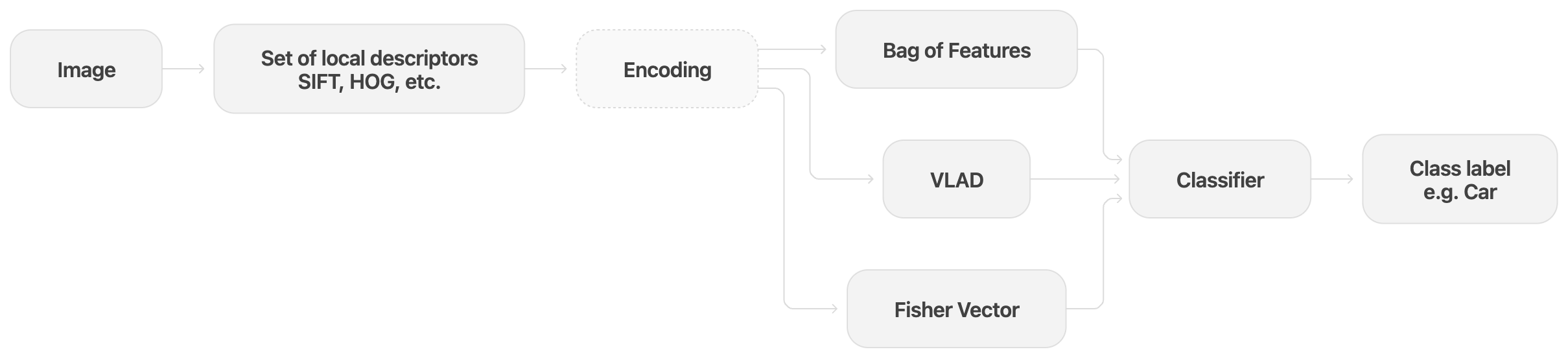
- Local descriptors: An image is represented by many local feature descriptors such as SIFT or HOG. The result is a set of descriptors, not a single vector.
- Encoding: Since different images can produce different numbers of descriptors, the set of descriptors is converted into one fixed-length vector. Bag of Features, VLAD, and Fisher Vector are different encoding methods for this purpose.
- Bag of Features: Each descriptor is assigned to the nearest representative feature, and the number of descriptors assigned to each representative feature is counted.
- VLAD: Instead of only counting assignments, VLAD stores how each descriptor differs from its nearest representative feature.
- Fisher Vector: It represents how the descriptors differ from a learned feature distribution, capturing more detailed statistical information.
- Classifier: The encoded fixed-length vector is given to a classifier, which outputs a class label such as car, person, or dog.
- Main idea: SIFT describes many local regions, while BoF, VLAD, and Fisher Vector combine those local descriptions into one image-level vector for classification.