OpenQASM 2.0
오픈캐즘
OPENQASM 2.0;
qreg q[1];
creg c[1];
h q[0];
measure q[0] -> c[0];
OPENQASM 2.0;
qreg q[10];
creg c[10];
x q[0]; ∣1000000000⟩
x q[1]; ∣1100000000⟩
x q[2]; ∣1110000000⟩
measure q[0] -> c[0];
measure q[1] -> c[1];
measure q[2] -> c[2];
Linear Algebra
Vectors
- In quantum computing, vectors represent quantum states.
- A 2-dimensional vactor can be written as:
- ∣ψ⟩=(ψ0ψ1)
Computational Basis
∣0⟩=(10),∣1⟩=(01)
- ∣ψ⟩ is a linear combination of basis states as follows:
- ∣ψ⟩=ψ0∣0⟩+ψ1∣1⟩=(ψ0ψ1)
Indentity Matrix
- Iψ⟩=[ψ0ψ1]
- I2=[1001]
Conjugate Transpose
- Bra: ∣ψ⟩†=(ψ0ψ1)†=(ψ0ψ1)=⟨ψ∣
- ⟨ψ∣:=∣ψ⟩†
- ket: ∣ψ⟩
- bra: ⟨ψ∣
- bra + ket: dot product ⟨ϕ∣ψ⟩
- Dagger: A=[acbd]⟹A†=[abcd]
psi_dagger = psi.conjugate().T
psi_dagger = psi.conjugate().transpose()
psi_dagger = psi.H
- (αA)†=αA†
- (A†)†=A
- (A+B)†=A†+B†
- (AB)†=B†A†
Hermitian
- A matrix is equal to its conjugate transpose.
- H=H†
A_dagger = A.H
AA_dagger = A * A_dagger
is_hermitian = AA_dagger.is_hermitian
Unitary
- A matrix whose conjugate transpose is also its inverse.
- U†U=UU†=I
- U=(cosθ−sinθsinθcosθ)
U = Matrix([
  [cos(theta), sin(theta)],
  [-sin(theta), cos(theta)]
])

U_dagger = U.H
U_dagger_U = trigsimp(U_dagger * U)

is_unitary = U_dagger_U == I
Inner Product
- ⟨ψ∣ϕ⟩=(ψ0ψ1)(ϕ0ϕ1)=ψ0ϕ0+ψ1ϕ1
- ∣⟨ψ∣ϕ⟩∣2=⟨ψ∣ϕ⟩⟨ϕ∣ψ⟩
- ∣⟨ψ∣ϕ⟩∣=∣⟨ϕ∣ψ⟩∣
Orthogonality
- ∣0⟩=(10),∣1⟩=(01)
- ⟨0∣1⟩=(10)(01)=0
- ⟨1∣0⟩=0
- ⟨0∣0⟩=(10)(10)=1
- ⟨1∣1⟩=1
⟨ψ∣ϕ⟩=ψ0ϕ0+ψ1ϕ1
- ∣ψ⟩=ψ0∣0⟩+ψ1∣1⟩,∣ϕ⟩=ϕ0∣0⟩+ϕ1∣1⟩
- ⟨ψ∣=ψ0⟨0∣+ψ1⟨1∣
- ⟨ψ∣ϕ⟩=ψ0ϕ0⟨0∣0⟩+ψ0ϕ1⟨0∣1⟩+ψ1ϕ0⟨1∣0⟩+ψ1ϕ1⟨1∣1⟩
- ⟨0∣1⟩=0,⟨1∣0⟩=0
Magnitude
∥ψ⟩∥2=∣ψ0∣2+∣ψ1∣2
- ∥ψ⟩∥=⟨ψ∣ψ⟩=∣ψ0∣2+∣ψ1∣2
- ∥∣ψ⟩∥2=⟨ψ∣ψ⟩
- ⟨ψ∣ψ⟩=ψ0ψ0+ψ1ψ1=∣ψ0∣2+∣ψ1∣2
Outer product
- ∣ψ⟩⟨ϕ∣=(ψ0∣0⟩+ψ1∣1⟩)(ϕ0⟨0∣+ϕ1⟨1∣)=ψ0ϕ0∣0⟩⟨0∣+ψ0ϕ1∣0⟩⟨1∣+ψ1ϕ0∣1⟩⟨0∣+ψ1ϕ1∣1⟩⟨1∣
- ∣ψ⟩⟨ϕ∣=(ψ0ψ1)(ϕ0ϕ1)=(ψ0ϕ0ψ1ϕ0ψ0ϕ1ψ1ϕ1)
- ∣0⟩=(10),∣1⟩=(01)
- ∣0⟩⟨0∣=(10)(01)=(0010)
- A=(a00a10a01a11)=a00∣0⟩⟨0∣+a01∣0⟩⟨1∣+a10∣1⟩⟨0∣+a11∣1⟩⟨1∣
Tensor Product
- ∣ψ⟩⊗∣ϕ⟩=(ψ0ψ1)⊗(ϕ0ϕ1)=ψ0ϕ0ψ0ϕ1ψ1ϕ0ψ1ϕ1
- ∣ψ⟩⊗∣ϕ⟩≡∣ψ⟩∣ϕ⟩≡∣ψϕ⟩
- A⊗B=(a00Ba10Ba01Ba11B)
- ∣0⟩⟨1∣⊗∣1⟩⟨0∣=(0010)⊗(0100)
- ∣0⟩⟨1∣⊗∣1⟩⟨0∣=0(0100)0(0100)1(0100)0(0100)=0000000001000000
- ∣0⟩⟨1∣⊗∣1⟩⟨0∣≡(∣0⟩⊗∣1⟩)(⟨1∣⊗⟨0∣)≡∣0⟩∣1⟩⟨0∣⟨1∣≡∣01⟩⟨10∣
- ket⊗ket,bra⊗bra
Qubit
∣ψ⟩=α∣0⟩+β∣1⟩
- where α,β are complex numbers satisfying ∣α∣2+∣β∣2=1.
- phase factor: eiϕ, turn the state by angle ϕ in the complex plane, but does not affect measurement probabilities.
- ∣eiϕ∣=1
One-Qubit Gates
Identity Gate
I=(1001)
Pauli-X Gate
X=(0110)
Pauli-Y Gate
Y=(0i−i0)
Pauli-Z Gate
Z=(100−1)
Hadamard Gate
H=21(111−1)
Rotation Gate
R(θ)=(cosθ−sinθsinθcosθ)
The Bloch Sphere
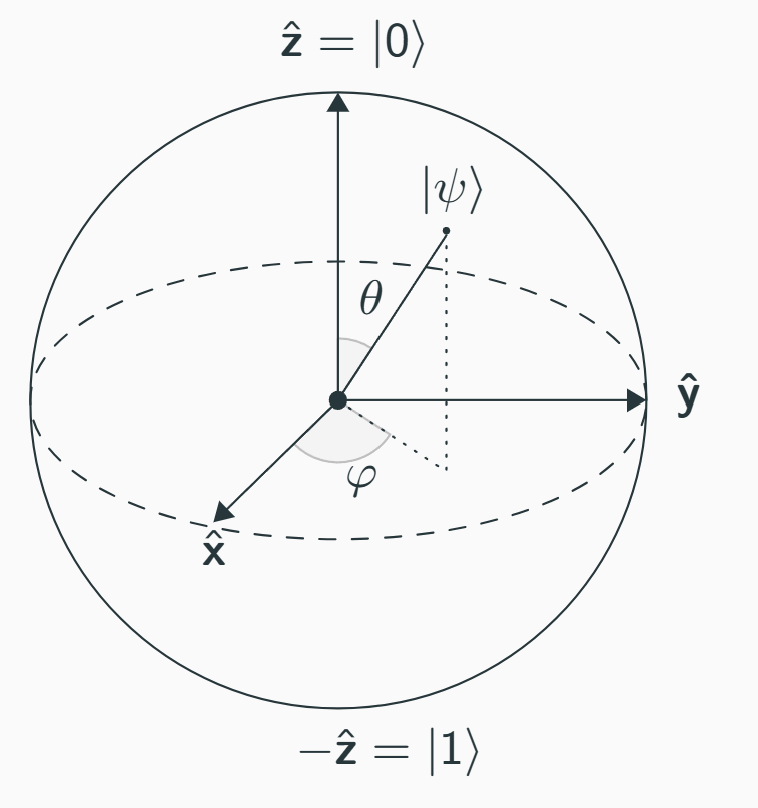
∣ψ⟩=cos(θ)∣0⟩+eiϕsin(θ)∣1⟩
- where 0≤θ≤π and 0≤ϕ<2π.
- θ: the polar (or colatitude) angle, measured from the "north pole" of the sphere.
- ϕ: the azimuthal (or longitude) angle around the equator.
Two-Qubit Gates
CNOT Gate
Controlled-NOT or CX gate
CNOT=1000010000010010
- CNOT gate flips the second qubit (target) if the first qubit (control) is ∣1⟩.
SWAP Gate
SWAP=1000001001000001
- SWAP gate exchanges the states of the two qubits.
Controlled-Z Gate
CZ=100001000010000−1
- CZ gate applies a Z gate to the second qubit if the first qubit is in state ∣1⟩.
Bases
- Computational Basis: {∣0⟩,∣1⟩}
- two qubits: {∣00⟩,∣01⟩,∣10⟩,∣11⟩}
- three qubits: {∣000⟩,∣001⟩,∣010⟩,∣011⟩,∣100⟩,∣101⟩,∣110⟩,∣111⟩}
Rule of Thumb
What starts on the left of the tensor product stays on the left.
- ∣ψ⟩⊗∣ϕ⟩≡∣ψ⟩∣ϕ⟩≡∣ψϕ⟩
- (∣ψ⟩⊗∣ϕ⟩)∗=⟨ψ∣⊗⟨ϕ∣
- (α∣ψ⟩+β∣ϕ⟩)⊗∣ω⟩=α∣ψ⟩⊗∣ω⟩+β∣ϕ⟩⊗∣ω⟩
- (⟨ψ∣⊗⟨ϕ∣)(∣ω⟩⊗∣η⟩)=⟨ψ∣ω⟩⋅⟨ϕ∣η⟩)
- (A+B)⊗C=A⊗C+B⊗C
- A⊗(B+C)=A⊗B+A⊗C
- (A⊗B)(C⊗D)=(AC)⊗(BD)
- (A⊗B)∗=A∗⊗B∗
Entanglement
- ∣Ψ⟩=α00∣00⟩+α01∣01⟩+α10∣10⟩+α11∣11⟩
- where ∥Ψ⟩∥2=1
- If the state is not separable, it is entangled.
- A state is separable if it can be written as a tensor product of two individual qubit state.
- ∣Ψ⟩=21(∣00⟩+∣01⟩)=21∣0⟩⊗(∣0⟩+∣1⟩)=∣0⟩⊗21(∣0⟩+∣1⟩)
- ∣Φ⟩=21(∣00⟩+∣11⟩)
- ∣Φ⟩=(a∣0⟩+b∣1⟩)⊗(c∣0⟩+d∣1⟩)=ac∣00⟩+ad∣01⟩+bc∣10⟩+bd∣11⟩
- ad=0,bc=0 which is impossible.
- entangled
Latex
\texttip{}: Displays a tooltip when hovering over the equation.\toggle{}: Toggles between two expressions.\begin{align}: Aligns equations, where the ampersand (&) marks the alignment points.\bbox[color, padding]{}: Puts a bounding box with the specified color and padding around an expression.\boldsymbol{}: Renders a bold version of symbols like variables.\cancel{}: Strikes through an expression.\cancelto{value}{}: Strikes through and labels with the specified value.\begin{cases}: Creates a piecewise function with conditions.\color{}: Applies a color to text or math expressions. You can use predefined colors or hex values.\enclose{}: Encloses an expression with various effects like circles or strikes.[mathcolor="color", mathbackground="color"]: Adds custom colors to the enclosing effect.\xmapsto{}: Creates an arrow with a label for mapping.\xlongequal{}: Creates a long equals sign with a label.\ce{}: Renders chemical equations or formulas.\newcommand{\ket}[1]{\left|#1\right\rangle}: defines a custom command for ket notation. \ket{\psi}\tag{}: Assigns a custom tag to an equation.\unicode{}: Inserts a Unicode character using its code.
Ref